
Many site owners confidently manage the world’s most popular website platform. WordPress security is crucial, though, because hackers love to attack WordPress sites. About 43% of all websites use WordPress. Wordfence counted 3,275 WordPress vulnerabilities by April 2025, and they expect to detect more than 10,000 by the end of 2025. The figure is a record number. If you fail to stay vigilant, the consequences could be severe, as hackers are constantly searching for vulnerabilities on WordPress sites. This post goes into excellent detail on the genuine threats (many of which are plugin-based) and how to protect yourself from them, from simple tweaks to more extensive hardening.
Every year, it seems like WordPress sites have a lot of security holes. Reports indicate that plugins accounted for between 96% and 77% of the newly discovered WordPress security holes in 2024. It was only 0.2% in the core and 3% in the themes. When you patch, you can’t always reach your goal. According to Patchstack’s report for 2023, there were about 6,000 new WordPress problems, which is 24% more than in 2022. Cross-Site Scripting (XSS) bugs caused more than 53% of all problems in 2023. A lot of them don’t need to log in, which makes sense. It’s even worse that old or rarely used apps often have security holes. A popular LayerSlider plugin from early 2024 had a big SQL attack hole (CVE-2024-2879) that hackers could use to steal data. To correct it, all you had to do was obtain version 7.10.1. In short, there are a lot of bad security holes. Most WordPress hacks happen because the code isn’t up-to-date or the passwords are too easy to guess.
Distribution of Recent WordPress Vulnerabilities: Plugins, by far, lead to security gaps.
| Component | % of Vulnerabilities | Source |
|---|---|---|
| Plugins | ~96–97% | Wordfence, Patchstack |
| Themes | ~3–4% | WebCare |
| Core | <1% | WebCare |
WordPress’s weak point is third-party add-ons, in other words. In real life, staying safe usually means carefully managing plugins and themes and making the core more secure. Let’s discuss the most common weaknesses and how to avoid them.
Common WordPress Vulnerabilities
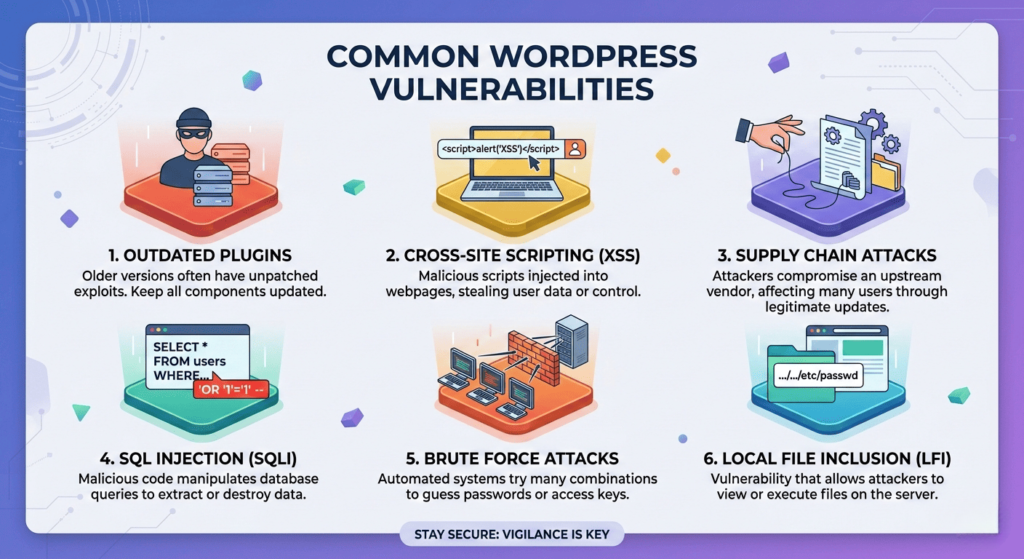
Cross-Site Scripting (XSS) lets attackers put harmful scripts on pages that other people view. For instance, a hacked plugin form field could let a hacker collect admin cookies or session tokens when an admin visits a page. XSS is still one of the most common WordPress problems because it takes advantage of trust: attackers use improperly sanitized input to run code in other people’s browsers.
SQL Injection (SQLi) happens when a theme or plugin doesn’t verify the inputs to the database. An attacker can send fake input (such as a URL or form) that changes how database queries work. This could mean that the whole database is open, including user accounts and passwords. In early 2024, the LayerSlider plugin (which had been installed more than a million times) had an SQL injection (SQLi) vulnerability that let people who weren’t logged in dump the contents of the database. The remedy was quick: as soon as feasible, update to the patched version (7.10.1). This example shows why you should always update or uninstall plugins, even little ones, if you don’t keep them up-to-date.
Cross-Site Request Forgery (CSRF) is a type of attack that tricks a logged-in user into doing things on the site that they didn’t mean to do. For example, an attacker might make new admin accounts or modify site settings without the admin knowing if they click on a malicious link while logged in. A lot of the time, CSRF problems happen because custom plugin code or theme forms don’t have “nonce” checks.
Authorization/Privilege Bypass: These problems let hackers have more access than they should. A poorly coded plugin might allow activities without checking user roles. For instance, if a plugin doesn’t verify user permissions, any logged-in subscriber might do admin duties or even gain access to important files like wp-config.php. These kinds of bypasses take advantage of poor internal checks and show how important it is to manage users carefully.
Brute-force login attacks aren’t “code bugs,” yet weak logins are a big problem. Attackers employ automated programs to try out thousands of passwords on /wp-login.php. Many default settings let you try as many times as you want. Even a strong password can be broken if it isn’t protected. (We’ll discuss remedies like rate-limiting, which restricts the number of attempts to access a service, and 2FA, or two-factor authentication, which adds an extra layer of security by requiring a second form of verification.)
Other common risks include file permissions that aren’t set up correctly, an exposed wp-config file, and an open directory listing. Botnets typically search for websites with changeable configuration files or default “admin” accounts. For example, the “admin” username on WordPress is a common target. Changing it makes various SQLi/guessing attacks less likely to work.
In short, practically any theme or plugin might be a way in. Automated scanners like WPScan are always uncovering new plugin bugs (there are over 70,000 WP-related vulnerabilities listed). The main point is to keep your code up to date, get rid of stuff you don’t use, and limit access.
WordPress Security Best Practices
It’s a constant endeavor to keep WordPress safe, but many of the best steps simply need a few changes. The first thing you should do is keep everything up-to-date. One expert says, “Keeping your WordPress core software up to date is the best way to keep your site safe.” Every time a new version comes out, it comes with patches for newly found flaws. Make sure to apply them right away. You should also update your plugins and themes right away as fixes come out, or turn them off and delete them if they aren’t being updated anymore. In real life:
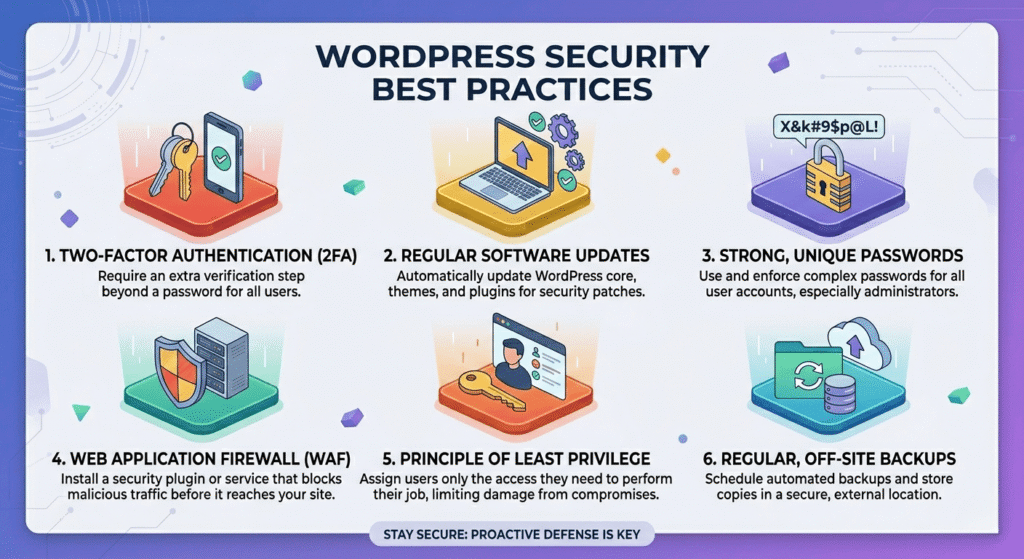
- Automatic Updates: Set up your site such that it automatically installs small updates and security fixes. Core can do this on its own, and many hosts and managed WP services even do large updates automatically. For trusted plugins and themes, use their auto-update settings.
- Remove Unused Extensions: Just disabling a plugin doesn’t necessarily eliminate its potential vulnerabilities, as its files could still be accessible. To maintain your site’s integrity, it’s wise to eliminate any plugins and themes you aren’t actively using. This simple step can thwart entire classes of potential attackers.
- Test in Staging: Before you overhaul your site’s core components or vital plugins, run your tests on a staging clone. This prevents any potential downtime. Many hosting dashboards offer straightforward staging environments.
Strong authentication is key. Weak or commonly used passwords can lead to vulnerabilities. Each account needs its own hard-to-guess password. Go for a minimum of 16 characters, and be certain to include a blend of uppercase and lowercase letters, numbers, and special symbols.
Don’t use “admin” or your domain as your username. Attackers will guess these first. Make sure that roles follow the “least privilege” rule: subscribers shouldn’t have admin capabilities, and editors shouldn’t even be able to manage plugins, which are software components that add specific features to a website, such as contact forms or galleries.
Require two-factor authentication (2FA) for all administrators. An attacker still requires the secondary code even if a password is cracked. “Two-factor authentication … defeats most credential-based attacks,” as best practices say.
Limit Login Attempts: Use a plugin or Web Application Firewall (WAF) rule to stop an IP address from logging in after three to five failed attempts. This effectively halts brute-force programs. Knowing that rogue bots can’t flood your login page forever can help you sleep better.
Protect Configuration and Core Files: Locking down critical files is crucial. Edit your site’s .htaccess (a configuration file for web servers) or server config to deny direct web access to wp-config.php (the file that contains your WordPress configuration settings). For example:
<Files "wp-config.php">
Require all denied
</Files>
This code, which goes against all WordPress rules, keeps people from seeing your database credentials. Also, use the official WordPress hardening method to set directories to 755 and files to 644 permissions (recursively). With 755/644, only the user of the server can write files. The web server and people who visit can only read them. There is one shell command for directories and files in WP’s documentation.
Disabling Theme/Plugin Editing: By default, WordPress lets admins change PHP code from the dashboard. This is risky because an attacker with admin access could use the editor to add backdoors. Put this line in your wp-config.php file to stop it
define('DISALLOW_FILE_EDIT', true);Remove the “Editor” menus and make all code changes via FTP (File Transfer Protocol) or controlled release. As a key defense, the government handbook stresses these points a lot.
Utilize HTTPS/SSL: Use HTTPS for all of your site’s traffic. This protects data (like cookies, keys, and API calls, which are requests made to an application programming interface) while it’s being sent. Nowadays, most hosts give away free SSL (Let’s Encrypt). The WordPress documentation actually says to hide the wp-admin area behind SSL to stop man-in-the-middle account theft. You should also consider adding extra server-side security. Some admins put HTTP Basic Auth, a simple authentication method that requires a username and password, in front of /wp-admin or /login to add a second layer of security. The WordPress documentation says this “second layer” protects against bots. This means that attackers must first bypass this additional security measure, even if they manage to break into WordPress.
Set up a Web Application Firewall (WAF). A WAF stops harmful traffic from reaching your site in the first place. Experts in security say that SQL leaks, XSS, DDoS, and other types of attacks can be stopped by using a host with a built-in WAF or a service like Jetpack’s firewall. By spotting odd behavior, a WAF can protect you from zero-day bugs, which are holes that don’t even have a resolution yet. WAFs are often included in the plans of managed WordPress hosts. Alternatively, you can use services like Cloudflare and Sucuri independently as reverse-proxy defenses. One of the best ways to get the most for your money is to set up a WAF (Web Application Firewall), which helps protect your website by filtering and monitoring HTTP traffic between a web application and the internet.
Add security plugins: Some of the most popular WordPress security plugins that can protect your site in many ways are Wordfence, Sucuri Scanner, and iThemes Security. They check for bugs, enforce rules, and can block IPs based on their location or notoriety. For example, Wordfence will tell you if an app has a known security flaw. A strong security plugin is a crucial component of a multi-layered strategy, despite the fact that third-party plugins require additional work.
Regular Backups and Monitoring: Back up your data often so you’re ready for the worst. Make a copy of your files and databases somewhere else, like offline or in the cloud. If you are attacked, you can go back to a clean state. It is important to keep backups offsite and test them, which is why the official advice is to do so. Look at the logs or use a service that will tell you when something strange happens. If something goes wrong, logs can help you find the break and get back to normal more quickly.
Extra Tips for Hardening: More experienced administrators can make the rules stricter. Putting wp-config.php above the web root is one way to make WordPress harder to hack because it can’t be reached. It also talks about using .htaccess, a configuration file for web servers, to lock down the wp-includes area and stop people from accessing it directly. When you don’t need XML-RPC (which is a protocol used for remote posts to a WordPress site), turn it off if you have shell access:
add_filter('xmlrpc_enabled', '__return_false');Lastly, get rid of version numbers (which can show that software is out of date) and make sure that your web server or plugins use acceptable security headers, such as Content Security Policy (CSP) and HTTP Strict Transport Security (HSTS).
Most WordPress sites can stop most attacks by using these defenses in a planned way. One expert says that simply keeping plugins and themes up to date would correct more than 96% of WordPress security problems. Think of security as layers: even if an attacker passes through one, they can be stopped by many others, like a firewall, two-factor authentication, strict file permissions, and so on. This means that you won’t be relying on just one solution since you’ve built a strong perimeter.
Summary: WordPress security is not about fear; it is about attention. We’ve discussed the most frequent methods attackers use to infiltrate sites (mainly through plugins and improper configurations), as well as real strategies to take to prevent them. Follow these recommended practices on a regular basis: Keep your software up to date, restrict access, and employ monitoring and security tools. As one concludes, security is a continual activity. Treat it as part of your site maintenance routine, rather than a one-time checklist.
To keep WordPress safe, you need to stay informed and take action. Please, share this guide as you wish.
I’d love to hear your thoughts on it, too. If you’re interested, you can access a deeper dive by subscribing.
Don’t wait for a hack to happen. Start using these WordPress security tips right away to keep your site and your users safe.